What is myumi? The AI music video service that makes a photo sing
myumi Team · Published November 16, 2026 · 6 min read
myumi makes a photo sing in an AI music video, lips following the lyrics, in five languages. How it works, and how it compares with singing-photo apps.
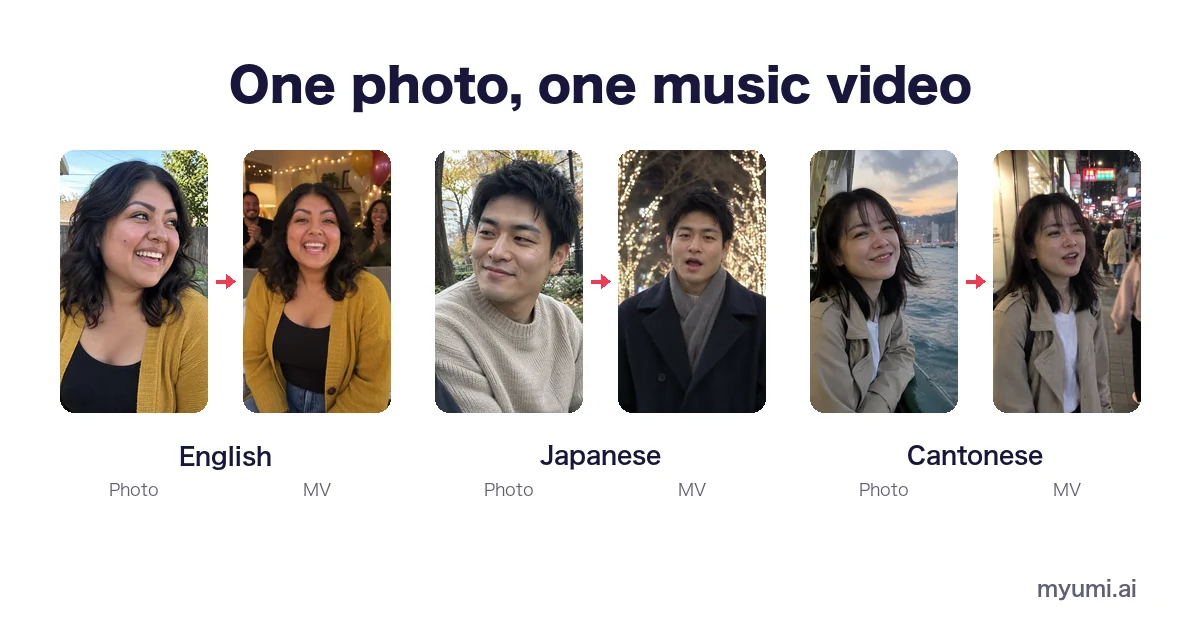
myumi is an AI music video service that makes a photo sing. Pick an MV template, add one photo and a song (or let myumi prepare one), and the person in the photo sings it, lips following the lyrics. It sings in English, Japanese, Mandarin, Cantonese and Taiwanese Hokkien. myumi (myumi.ai) is run by UPRO AI PTE. LIMITED in Singapore. The waitlist opened in November 2026.
This article explains what myumi is, how it makes a photo sing, and how it differs from singing-photo apps and AI music video generators.
What is myumi? One photo and one song make one music video
Most of us have a photo we love: one from a trip, one from a friend’s birthday, one from a summer by the sea. What myumi does is simple: it gets the person in that photo to sing a song, in a music video.
You need three things, and one of them is optional:
- One photo. The person in it becomes the star of the video.
- An MV template. Birthday Party, Karaoke Star, K-pop Concept, Cinematic Love Song, City Pop Retro, Y2K Digicam, Brooklyn Sunday, Anime and more. The template sets the scene and the shots.
- One song. Upload your own. No song? myumi can prepare one.
What you get is a music video in which the person in the photo sings, their lips following the lyrics.
How to make a photo sing: three steps
- Pick an MV template from the trending MV templates.
- Add one photo. The person in it becomes the singer.
- Add a song, or let myumi prepare one. The person in the photo starts singing.
No prompts to write and no editing. Every template has a sample you can watch and hear first, such as Cinematic Love Song, Birthday Party or Anime.
Singing-photo apps, AI music video generators and myumi
Search for “make a photo sing” or “AI music video generator” and you’ll find three kinds of tools. They solve different problems:
| Kind | What you put in | What you get | Examples |
|---|---|---|---|
| Singing-photo and lip-sync apps | One photo + a song or voice clip | A short clip of the face lip-syncing, usually a single shot | CapCut, Dreamina, HeyGen, DreamFace |
| AI music video generators | A song (some take a photo too) | A video generated to fit the song | Neural Frames, SunoMV, OpenArt |
| Photo slideshows and video templates | Several photos + background music | Photos fading in and out; nobody moves | Birthday video templates |
| myumi | One photo + one song (optional) + an MV template | A music video where the person in the photo sings, lips following the lyrics | — |
Which one do you need? To make a photo move for a fun lip-sync clip, a singing-photo app is enough. To put lots of photos into one video, use a video template. If you want a music video starring the person in your photo, really singing the song you chose, that’s what myumi is for: not an effect that moves a mouth, and not a slideshow, but a music video shot in today’s trending MV styles.
Four things that set myumi apart
1. It sings in the song’s language, including Cantonese and Hokkien
The person sings in whatever language the song is in, and their lips match the words: English, Japanese, Mandarin, Cantonese and Taiwanese Hokkien. myumi names each language and shows a sample, like the Cantonese Hong Kong Neon Nights.
2. Pick a trending MV template instead of writing prompts
You don’t need prompts or editing skills. The template decides the scene and the shots: City Pop Retro, K-pop Concept, Y2K Digicam, Karaoke Star and more.
3. One photo is enough, and you don’t need a song
There’s no need to collect lots of photos. If you write or sing your own songs, make a video for one of them; if you don’t have a song, myumi can prepare one.
4. Clear rules for photos and songs
Use your own photo, or a photo of someone who agreed. Minors need a parent’s or guardian’s consent, and photos of celebrities aren’t allowed. For songs, use one you made or have permission to use: commercial recordings, streams and karaoke tracks need permission from their rights holders. myumi doesn’t change or copy voices; the video uses the vocals in the song. See the Terms of Service.
What can you make with it?
- Birthdays. Add one photo of the birthday person and they sing in their own music video. See birthday singing video.
- A video for your own song. Musicians and creators can star in a video for their track. See AI music video with your face.
- Songs in other languages. A Cantonese song in Hong Kong Neon Nights, or a Japanese one in City Pop Retro: every template works with all five languages.
- Anime. With Anime, the person in the photo becomes an animated character who sings.
If you use someone else’s photo, ask them first.
Can I use it now?
Not yet. myumi is still getting ready, and the waitlist opened in November 2026. We’ll email everyone on the list as soon as it launches. You can join from the home page.
FAQ
What is myumi?
An AI music video service that makes a photo sing. Pick an MV template, add one photo and a song, and you get a music video in which the person in the photo sings, lips following the lyrics.
Is there an app that makes a photo sing?
Yes, several. myumi is one of them: from one photo, it makes a music video in which the person sings. The waitlist is open now.
Which languages can it sing in?
English, Japanese, Mandarin, Cantonese and Taiwanese Hokkien.
How much does it cost?
We’ll announce pricing at launch.
Can I use my own song? What if I don’t have one?
Both work. Upload a song you made or have permission to use, or let myumi prepare one.
Can I use someone else’s photo?
Only with their consent. Minors need a parent’s or guardian’s consent, and photos of celebrities aren’t allowed.
Are the people in the samples real?
No. They’re AI-generated people.
How do you pronounce myumi?
It’s pronounced MYOO-mee.