How to turn a photo into a music video
myumi Team · Published November 16, 2026 · 6 min read
Turn one photo and a song into a music video where the person in the photo sings. How it differs from a slideshow, which photos work, and ideas for birthdays.
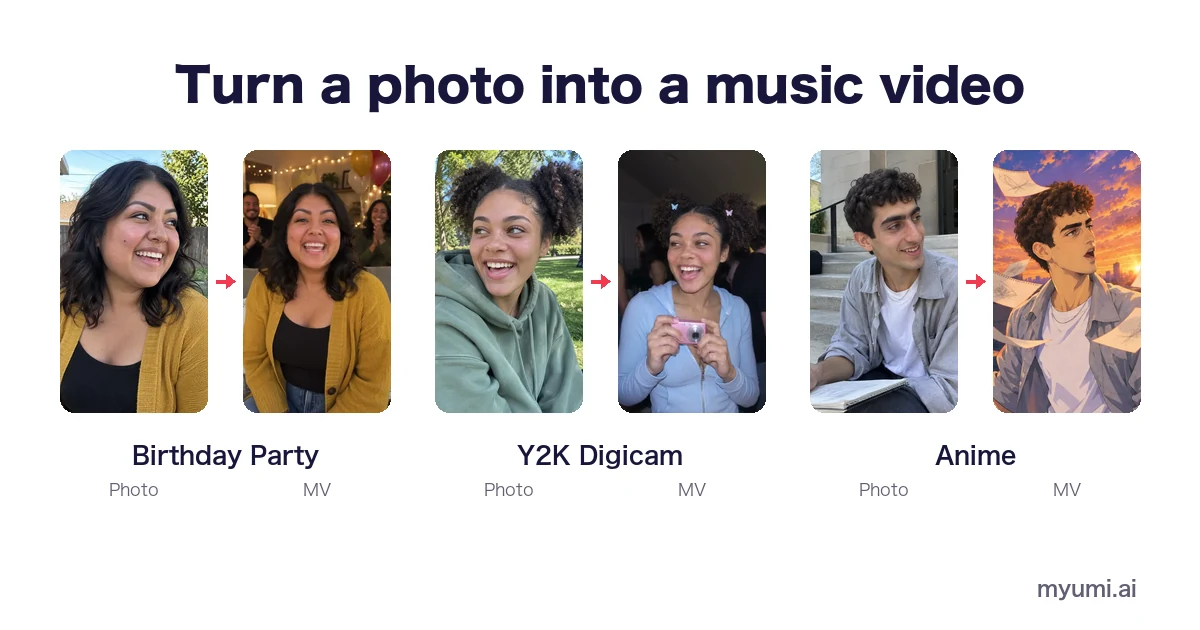
To turn a photo into a music video, you need one clear photo of a person, a song you can use and a tool that makes the person sing it. In myumi you pick an MV template, add the photo and the song, and the person in the photo sings in the template’s scenes, lips following the lyrics. If you only want a still photo with music behind it, a phone video editor is enough.
This guide covers the difference between a photo music video and a slideshow, how to make one step by step, which photos work, and ideas for birthdays and gifts.
Photo music video or slideshow?
Searching “photo to music video” turns up two very different things:
| Photo slideshow | Photo music video | |
|---|---|---|
| What goes in | Several photos + background music | One photo + a song |
| What moves | Photos fade, slide or zoom | The person in the photo sings |
| Singing | No | Yes, lips following the lyrics |
| Editing | You arrange photos on a timeline | A template sets the scene and the camera |
| Best for | Trips, years in review, memorials | Birthdays, gifts, a video for your own song |
Neither is better; they do different jobs. If you have twenty photos from a holiday, make a slideshow. If you have one photo of someone and want them to sing, that’s a photo music video.
How to turn a photo into a music video
1. Choose the song
Use a song you made, one you have permission to use, or let myumi prepare one. Commercial recordings, streams and karaoke tracks need permission from their rights holders. If the song comes from an AI music tool, check that tool’s terms; for Suno, see How to make a music video for your Suno song.
2. Choose the photo
One person, face and mouth clearly visible, good light. More on this below.
3. Choose the look
Pick an MV template that fits the song and the occasion: Birthday Party for a birthday, Cinematic Love Song for an anniversary, Y2K Digicam for a party throwback, Anime if you’d rather the person appear as an animated character. All templates are on MV templates, each with a sample.
4. Make it
Add the photo and the song, and the person starts singing in the template’s scenes, their mouth following every line. No prompts and no editing.
5. Share it
Vertical video suits TikTok, Reels and Shorts. Before posting, turn on the platform’s AI label: YouTube asks creators to disclose realistic AI content (YouTube Help), and TikTok asks for a label on AI content showing realistic people (TikTok Community Guidelines).
Which photo should you use?
Works well
- One person, facing the camera or turned slightly
- Face and mouth clearly visible
- Bright, sharp and without heavy filters
- The face large in the frame
Avoid
- Group photos
- Masks, hands, a microphone or a glass in front of the mouth
- Dark, blurry or heavily edited photos
Whose photo? Your own, or someone who has agreed. Minors need a parent’s or guardian’s consent, and photos of celebrities aren’t allowed. An old photo can work if the face is clear and the person in it has agreed.
Ideas for a photo music video
- Birthdays. The birthday person sings in their own video. See Birthday singing video.
- Gifts for family. A song in the language they grew up with: Cantonese on Cantonese song MV, Taiwanese Hokkien on Taiwanese Hokkien song MV, Mandarin on Mandarin song MV.
- Your own song. Already have a track? Star in its video. See AI music video with your face.
- Staying off camera. The Anime template turns the person into an animated character who sings.
FAQ
Can I make a music video from just one photo?
Yes. One photo is enough for myumi: the person in it becomes the singer.
How do I add music to a photo for free?
If you just want a still photo with music behind it, most phone video editors can do it. For the person in the photo to sing, you need a tool like myumi. Its pricing will be announced at launch.
Can I use more than one photo?
myumi uses one photo per video: the person in it sings. For lots of photos, a slideshow is the better fit.
Can I make a photo sing “Happy Birthday”?
Yes, if you have a recording you’re allowed to use, ideally one person singing. Or pick Birthday Party and let myumi prepare a song.
Can I make a photo sing and dance?
myumi focuses on singing. The K-pop Concept template adds small moves on the beat, not choreography.
Do I need editing skills?
No. The template sets the scene and the camera, so there’s no timeline to edit.
Are the people in the samples real?
No. The sample people and songs are AI-generated.