How to make a music video for your Suno song
myumi Team · Published November 16, 2026 · 7 min read
Suno doesn’t make full music videos. How to turn a Suno song into an MV where a photo sings it, and what Suno’s 2026 rules say about using songs in videos.
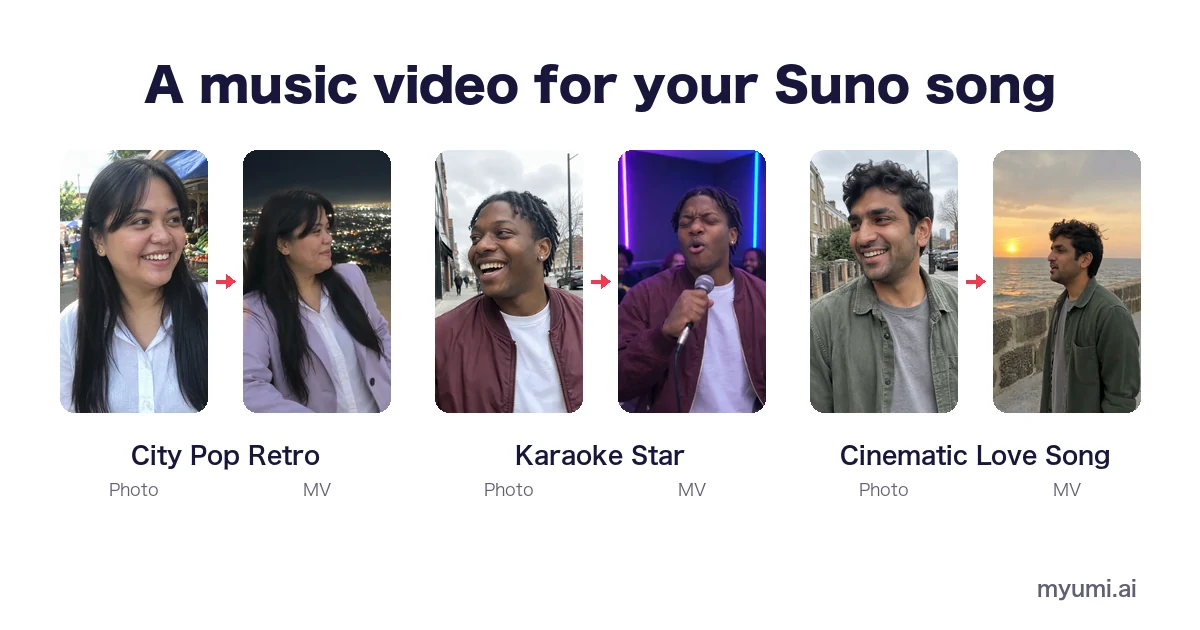
Suno makes the song; it doesn’t make a full music video. To get one, make and download the song on a paid Suno plan, then use a music video tool: add a photo and the song, and the person in the photo sings it, lips following the lyrics. Before you post, check two rules: Suno’s rules for using songs in videos, and YouTube’s and TikTok’s AI labels.
This guide explains what Suno can and can’t do with video as of November 2026, what its current terms say about putting your songs in videos, and how to make a music video for a Suno song step by step.
Can Suno make a music video?
Not a full one. As of November 2026, Suno has three video-related features, and none of them makes a video where a singer performs your song (its v6 model can also take a video as a starting idea, and Scenes turns photos into a song):
- Cover art. Since July 2026 you can start from an image and a prompt and get a new image or a video as the song’s cover art (Suno release notes).
- Looping song art. You can upload your own clip of up to 10 seconds to loop behind the song (Suno release notes).
- Hooks. You pair a song with a video you upload yourself (Suno help).
So if you want someone on screen singing the whole song, with lips that match the words, you need a separate music video tool.
First: can you use your Suno song in a video?
Suno changed its terms in 2026 (revised 10 August, effective 3 September). What matters for a music video is which plan you were on when you made and downloaded the song.
| Free plan | Pro or Premier | |
|---|---|---|
| Who owns the songs | Suno keeps ownership | Suno assigns its rights in the songs to you |
| What you can do with them | Personal, non-commercial use only; they can’t be monetized | Commercial use, including videos you post to YouTube or TikTok |
| Downloads | None: free accounts no longer include trial downloads | A monthly download allowance (20 on Pro, 60 on Premier) |
| What to watch for | Upgrading later doesn’t make old free-plan songs commercial by default | Commercial rights come with songs downloaded while you’re subscribed |
A few details from Suno’s own pages:
- Download while you’re subscribed. Suno’s terms say you may not commercially use output that hasn’t been downloaded, and its help center says songs downloaded while subscribed get commercial use rights (Terms, help).
- Old trial downloads don’t count. Suno says trial downloads don’t grant commercial use rights (help).
- Upgrading later isn’t retroactive. Subscribing doesn’t give you commercial rights to songs you made on the free plan by default (help).
- Rights to downloads you made on a paid plan stay with you if you cancel or downgrade later (Terms).
- No credit needed. Paid-plan songs can be used in videos you post to YouTube, TikTok and elsewhere without crediting Suno (help).
- Remixes are non-commercial on every plan (Terms).
This is a summary, not legal advice. Suno’s terms change; read the current version before you publish.
How to make a music video for a Suno song
1. Make and download the song on a paid plan
Download the finished song while you’re subscribed. For a short video on TikTok, Reels or Shorts, note where the chorus starts: that’s the part people remember.
2. Pick the look that fits the genre
Match the scene to the song. A synth-pop track suits a neon night drive; a ballad suits a beach at sunset; a party song suits a karaoke room. In myumi each look is an MV template with a sample you can watch first: City Pop Retro, Cinematic Love Song, Karaoke Star, K-pop Concept or Anime if you’d rather not show a real face.
3. Choose the singer’s photo
One clear photo of one person, with the face and mouth visible. Use a photo of yourself, or of someone who has agreed. Minors need a parent’s or guardian’s consent, and photos of celebrities aren’t allowed. More tips: How to turn a photo into a music video.
4. Make the video
With myumi, you pick the template, add the photo and upload the Suno song. The person in the photo becomes the singer, with lips that follow the lyrics, inside the template’s scenes. There are no prompts to write and no timeline to edit. Sign-ups for the waitlist are open, and pricing comes at launch.
5. Label it and post
Both YouTube and TikTok ask you to label realistic AI content:
- YouTube requires creators to disclose realistic AI-generated or altered content, and its list explicitly includes content that “creates music that’s the main focus of the video” (YouTube Help). Turn on the “AI use” setting when you upload in YouTube Studio.
- TikTok asks creators to label AI-generated content that shows realistic scenes or people (TikTok Community Guidelines).
A realistic video of a photo singing an AI-generated song will normally need the label on both.
AI vocals and languages
Suno songs often come with AI vocals, sometimes in a language other than English. myumi doesn’t change the voice: the video uses the vocals in your song, and the person in the photo sings them with lips that follow the lyrics. It sings English, Japanese, Mandarin, Cantonese and Taiwanese Hokkien. Hear a Cantonese sample on Cantonese song MV, or Taiwanese Hokkien on Taiwanese Hokkien song MV.
Tips for a better Suno music video
- Keep one singer. A clear lead vocal is easier to follow than stacked harmonies or a duet.
- Keep the files. Save the downloaded song and the date you made it, in case you need to show you had the rights.
FAQ
Can Suno make music videos?
Not full ones. As of November 2026 Suno can make cover art (an image or a video), loop a clip you upload, or pair a song with your own video (Hooks). For a video where someone sings the whole song, use a separate music video tool.
Can I use a free-plan Suno song in a YouTube video?
Only for personal, non-commercial use, and it can’t be monetized. Free accounts also no longer include downloads. For a video you’ll monetize or use commercially, make and download the song on a paid plan.
If I upgrade, can I use songs I made on the free plan?
Not by default. Suno says subscribing doesn’t give retroactive commercial rights to free-plan songs, though it may offer them in some cases.
Can I make a Suno music video for free?
Suno’s free plan keeps songs non-commercial and no longer includes downloads, so the song itself is the first limit. myumi will announce its pricing at launch.
Do I have to credit Suno in my video?
Suno says paid-plan songs can be used in videos on YouTube, TikTok and elsewhere without crediting Suno.
Do I need to label my Suno music video as AI?
On YouTube, yes if it looks realistic: its disclosure rules name AI music that’s the main focus of the video. TikTok also asks for a label on realistic AI content.
Can myumi make a video for my Suno song?
Yes, once it launches: upload a song you have the rights to use, add one photo and pick an MV template, and the person in the photo sings it. myumi is taking waitlist sign-ups now.