How to make an AI music video: a step-by-step guide
myumi Team · Published November 16, 2026 · 7 min read
Get a song you can use, choose a look and a singer, generate, cut and label: a step-by-step guide to making an AI music video, with costs, rights and YouTube.
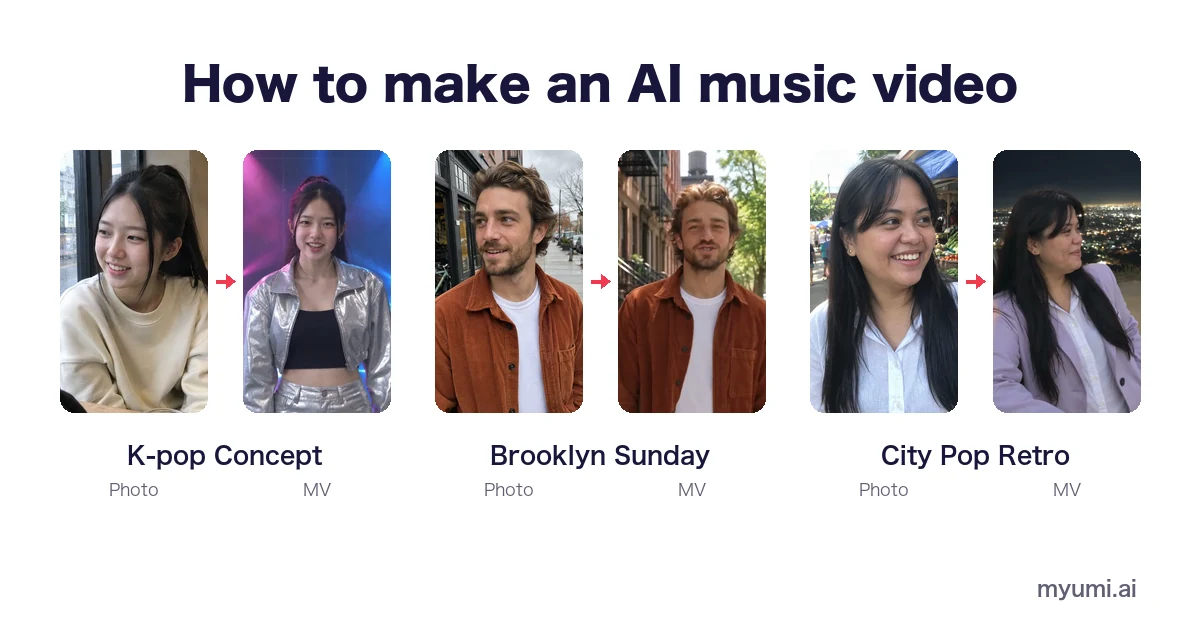
To make an AI music video: get a song you have the rights to use, decide the look, choose who sings, generate the video, cut it for where you’ll post, and turn on the platform’s AI label. You can generate clips and edit them on a timeline, or use a template tool where one photo and one song turn into a music video.
This guide walks through each step, compares the two ways of working, and covers what people ask most: cost, rights and YouTube.
Two ways to make an AI music video
| Generate clips and edit | One photo + a template | |
|---|---|---|
| How it works | Write a prompt for each scene, generate clips, cut them together on a timeline | Pick a template, add one photo and the song |
| Who sings | Usually nobody on screen, or a character you keep consistent across clips | The person in the photo, lips following the lyrics |
| Control | High: you design every shot | Lower: the template sets the scenes and camera |
| Effort | Hours of prompting and editing | A few choices |
| Best for | Visual artists, abstract or story videos | A video starring a person singing the song |
myumi is the second kind. The steps below work for both.
Step 1: Get a song you can use
The song is the part people forget to check. You can use:
- A song you made (and, if you co-wrote it, your co-writers agree).
- A song you have permission to use. Commercial recordings, streams and karaoke tracks need permission from their rights holders; a song being popular doesn’t make it free to use.
- A song from an AI music tool, within that tool’s terms. Suno, for example, gives commercial rights for songs made and downloaded on a paid plan; see How to make a music video for your Suno song.
- A song myumi prepares, if you don’t have one.
Step 2: Decide the idea and the look
Match the visuals to the song’s mood and genre:
- Upbeat pop or a party song: Karaoke Star, K-pop Concept, Y2K Digicam
- A ballad or love song: Cinematic Love Song
- Synth-pop or retro: City Pop Retro
- A birthday: Birthday Party
- A sunny, easy song: Brooklyn Sunday
- Rather not show your real face: Anime
Also decide where it will be posted. If you’re cutting clips yourself, frame them vertically (9:16) for TikTok, Reels and Shorts, or horizontally for a regular YouTube video.
Step 3: Choose who sings
If the video stars a person, choose one clear photo: face and mouth visible, good light, one person. Use your own photo or a photo of someone who has agreed; minors need a parent’s or guardian’s consent, and photos of celebrities aren’t allowed. Tips: How to turn a photo into a music video.
Step 4: Generate the video
- With myumi: pick the template, add the photo, upload the song, and the person in the photo performs it in the template’s scenes. myumi sings English, Japanese, Mandarin, Cantonese and Taiwanese Hokkien.
- With clip generators: write a prompt per scene, generate several takes, and keep the character’s look consistent between clips.
Why singing is harder to lip sync than speech: AI lip sync music video.
Step 5: Fit it to where you’ll post
- Short-form: trim the song to start at the chorus before you generate. The first seconds decide whether people keep watching.
- Full song: keep the look consistent from start to end.
- Clip workflow: add captions or lyrics in your editor if your viewers watch with the sound off.
Step 6: Label it and post
- YouTube requires creators to disclose realistic AI-generated or altered content, and its list includes AI music that’s the main focus of the video (YouTube Help).
- TikTok asks for a label on AI content showing realistic scenes or people (TikTok Community Guidelines).
Turn the label on when you upload. It’s also more honest with your audience.
How much does an AI music video cost?
It depends on the tool and the length. Most charge credits or a subscription, and many free plans add a watermark or limit the length. For what photo-singing tools charge, see Photo-singing apps compared.
FAQ
Can I make an AI music video for free?
Free plans usually add a watermark or a length cap, and the song has to be free to use too: your own song works, while Suno’s free plan no longer includes downloads. myumi will announce pricing at launch.
Do I need to write prompts or a storyboard?
Not with a template tool. With myumi you choose a template; the scenes and camera are set for you.
Can I make an AI music video of myself?
Yes: use a photo of yourself and your song. See AI music video with your face.
Can I use my own song?
Yes, as long as you made it or have permission to use it.
Can I monetize an AI music video on YouTube?
You need the rights to the song and permission for the photo, and you need to turn on YouTube’s AI disclosure. Check YouTube’s monetization policies for the rest.
Which languages can the person sing in?
In myumi: English, Japanese, Mandarin, Cantonese and Taiwanese Hokkien.